
Picsart AI Photo Editor, Video
PicsArt, Inc.Rating4.1

Installs
1B+
Developer
PicsArt, Inc.
Category
Video Players & Editors
Content Rating
Rated for 12+
Developer Email
support@picsart.com
Privacy Policy
https://picsart.com/privacy-policy
Screenshots

About this app
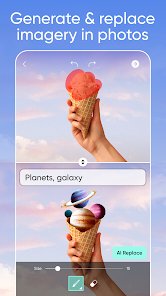
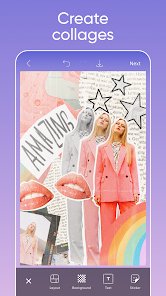
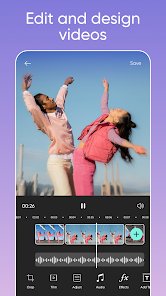
Picsart AI Photo Editor, Video is an all-in-one creative app from PicsArt, Inc. for editing photos and videos on Android and iOS. It combines traditional editing tools with AI-powered features, letting users retouch images, remove or replace backgrounds, apply filters and effects, add text and stickers, and create collages. On the video side, it offers trimming, transitions, music, and effects for short-form content. AI tools include image generation, AI-based enhancements, and one-tap background removal. A large library of templates, fonts, and creative assets supports social media posts, stories, and marketing visuals. Picsart is designed for casual creators, social media users, small businesses, and designers who want versatile editing without professional software.
Expert Review
Picsart packs an enormous amount of creative power into a mobile app, and that breadth is both its main appeal and its main challenge. The toolkit is genuinely impressive, spanning detailed photo retouching, quick background removal, collages, video editing, and a growing set of AI generation features that produce eye-catching results with little effort. The template library is a real time-saver for social media creators who need polished posts fast. The trade-off is complexity and monetization: the interface can feel crowded for newcomers, and many of the most desirable tools, watermark-free exports, and premium assets require a Gold subscription. Free users will encounter prompts and limitations frequently. Performance is solid on modern devices but can lag on older hardware given how feature-rich it is. For creators who will actually use its range, Picsart offers excellent value; lighter users may find it more than they need.
Key Functional Highlights
- AI background removal and one-tap photo cutouts
- AI image generation and smart photo enhancements
- Filters, effects, retouching, and collage tools
- Video editing with trimming, music, and transitions
- Large library of templates, fonts, and stickers
Advantages & Benefits
- Replaces several editing apps with one toolkit
- Produces social-ready visuals quickly using templates
- AI tools make advanced edits accessible to beginners
- Works for both still photos and short videos
- Frequent new effects and assets keep content fresh
More Apps
-

ESPN
Disney4.3
-

FOX Sports: Watch Live Games
Fox Digital Services, LLC3.7
-

Subway®
SUBWAY Restaurants4.2 -

Zoom - One Platform to Connect
zoom.us4.1 -

Amazon Shopping
Amazon Mobile LLC4.1 -

Sam's Club: Shopping & Savings
Sam's Club4.8 -

WhatsApp Messenger
WhatsApp LLC4.5 -

Telegram
Telegram FZ-LLC4.2 -

PayPal - Send, Shop, Manage
PayPal Mobile4.3